Hyper-V Server
Updated April 2024
While the majority of applications function seamlessly when set up on a Fresh Start machine using DaDesktop (DD), a small number of applications may exhibit unexpected behaviour due to the cloning process. In these instances, additional configuration steps are required to ensure optimal performance.
System Specifications
- Hyper-V Server 2019 or later (other versions are likely to exhibit similar issues)
- Deployed using the Windows 10 or Windows Server 2019 template
Fresh Start Remediation Notes
-
Please be aware that the following is a general guide for resolving this issue within the Fresh Start environment. The specific steps may vary slightly based on your unique configuration.
-
Overview - Apply the Fresh Start fix as outlined below. When cloning from the FreshStart machine, Hyper-V may encounter issues with duplicate MAC addresses on the External switch. To resolve this, you can either select the second pre-configured Intel network connection or remove the external switch in the FreshStart machine prior to cloning. The detailed procedure is explained below.
Remediation Procedure
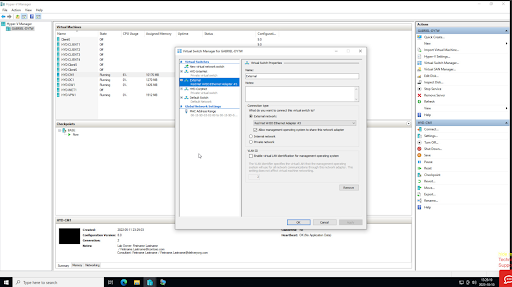
1. The image below displays the Hyper-V Manager application. Right-click to access the Virtual Switch Manager dialog box.
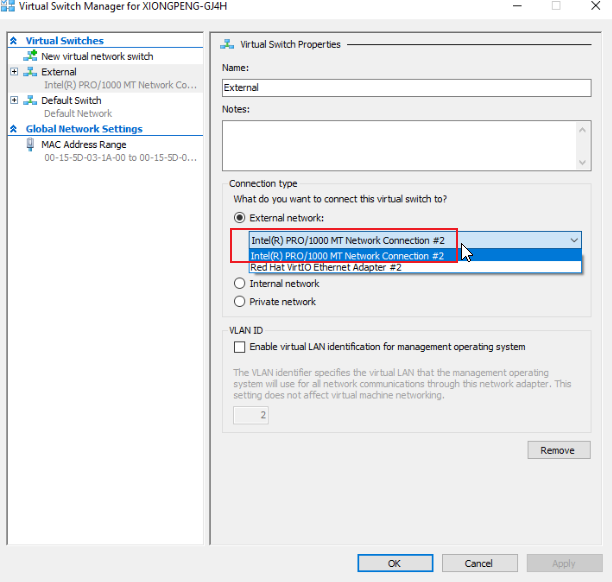
2. In the Virtual Switch Manager dialog box shown below, select the 'External' switch and choose the Intel Pro /1000 network connection. Note that this option is only available when using newer Windows 10 templates, version 71 and above. Click OK, and save the configuration if prompted. Finally, close the Hyper-V Manager application.
3. Proceed with the FreshStart machine configuration as needed. Once the setup is complete, shut down the machine from within the VM, ensuring it has fully stopped. After that, clone the FreshStart machine to the Trainer and Participant machines as required.
The Hyper-V server should now operate correctly on the Trainer and Participant machines. Without this adjustment, participants may inadvertently view other machines instead of their own, as cloning the external network card results in duplicate MAC addresses on the External switch when cloned from the FreshStart machine.
If you continue to experience difficulties, please reach out to DaDesktop Support via the chat app, and we will be pleased to assist you.